
Canva tips for text editing, tutorial video shows how to insert text box in Canva, and then we can use text box for Edit text and add text effects. Steps are easy to follow for Canva beginners. Happy sharing and I hope this helps. More Canva Tutorial are available here.
How to insert text box in Canva
We can follow these steps to insert text box in Canva,
1. After creating a design page in Canva, we can go to left tool bar, and select Text
2. In Text panel, click Add a text box button
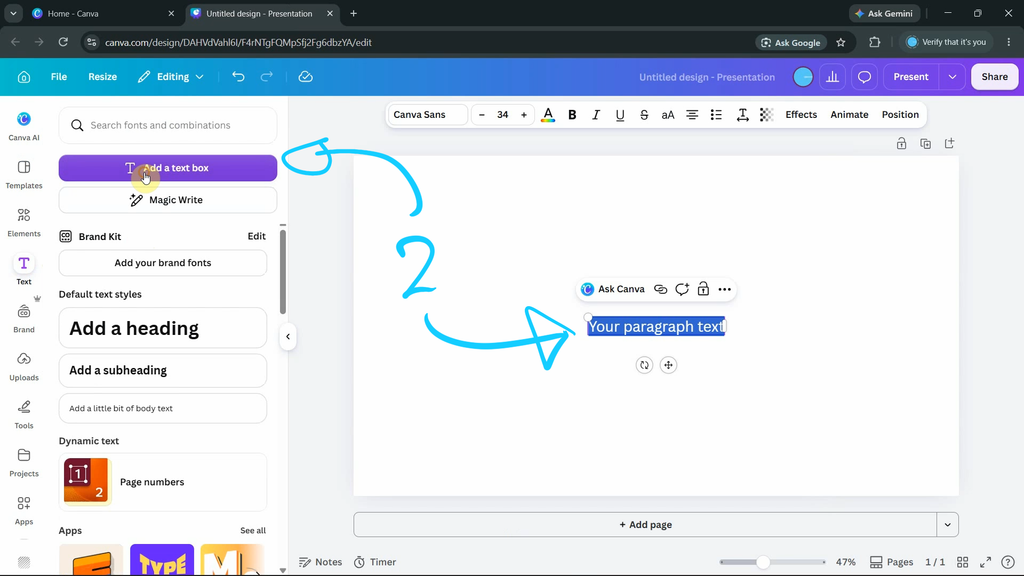
3. Then text box is inserted, and then we can edit text
In addition, we can find all these steps visually in YouTube video, watch here,

Timestamp
0:00 Intro – How to add a text box in Canva
0:14 Add Text Box
0:25 Change Text and text size
0:36 Change Text Font
0:50 Add Effects to Text Box
Click here to subscribe this YouTube channel, more video will be shared with you.
Feel free to watch more video on【YouTube Playlist】
by artist.b@cgian.com
Have fun with CG. Let’s Create!
#cgian #canva #graphicsdesign
Continuous Reading:
Canva text spacing tutorial
Canva round text box tutorial
Feel free to share this post with your friends or send it to yourself to bookmark it
