
It seems that Blender doesn’t have the smooth mesh preview of 3D object. But we can use “Subdivision Surface” instead of smooth preview. Hope this helps! More Free Blender Tutorial here.
How to make Blender smooth mesh preview with Subdivision Modifier
Solution:
1. Go to Object mode
2. Select the object you want to make smooth preview.
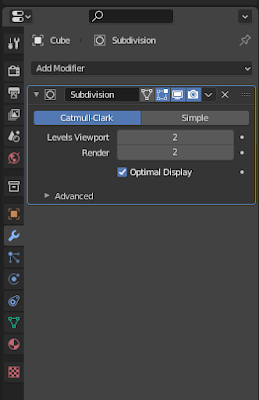
3. In Modifier Properties, add “Subdivision Surface”.
4. Adjust the value in “Levels Viewport”
#blender #cgian #b3d
Continues Reading:
How to Toggle X Ray Mode in Blender
How to switch Perspective view to Orthographic view in Blender
Blender How to select back Vertices, Edges, Faces behind object
Blender How to add subdivision surface modifier with shortcut
Tips and Tricks
by artist.B@cgian.com
