
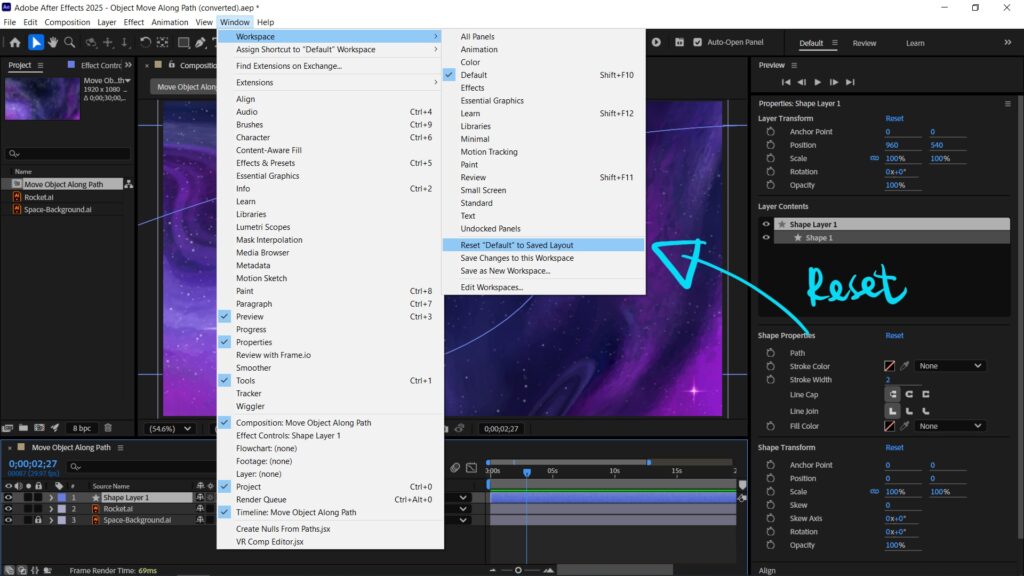
After Effects basics, quick steps to show After Effects how to reset workspace. When we edit the animation in composition in After Effects, we might customize our workspace or layout for editing. If we want to go back to default workspace, we can reset workspace as below screenshot.
After Effects how to reset workspace
We can go to top tool bar, and go to Window > Workspace > Reset “Default” to Saved Layout
Happy sharing and I hope this helps. More After Effects Tutorial are available here.
More tutorial video will be shared with you.
Subscribe YouTube channel for more After Effects Tutorials!
by artist.b@cgian.com
Have fun with CG. Let’s Create!
#cgian #adobe #aftereffects #tutorial
Continuous Reading:
After Effects how to undo precompose
How to make a shape into a mask in After Effects
How to export QuickTime with RGB + Alpha in After Effects
After effects select all keyframes with shortcut tutorial
Feel free to share this post with your friends or send it to yourself to bookmark it
